Create a Word document that contains these embellishments

for this assignment please follow instructions . I attached lesson 7 to help

Create a Word document that contains these embellishments:

– Drop Caps

– Watermarks

– Page Color

– Border and Shading

– And add a shape

When you are confident with your skills using these embellishments, submit your test document or describe what you did.

lesson 7

Lesson 7: Desktop Publishing

Adding Drop Caps

A drop cap is a simple embellishment that, if used correctly, can make your documents look more interesting and professional. Basically, it’s a letter at the beginning of a section or paragraph that is larger than the text that follows it, but instead of extending upward (which is what it would do if you just tried to increase the font size for a single letter) it drops a few lines down:
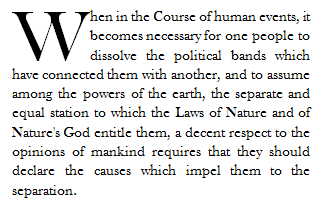
Creating a drop cap in Word 2010 is incredibly easy. Just go to the Insert tab and click the Drop Cap button in the Text section of the ribbon. The cursor should be positioned in the paragraph you’d like to add the drop cap to, but it doesn’t necessarily have to be in front of the letter you want to add the effect to.

You can choose to place the drop cap within the paragraph or in the margins. To exercise a little more control over it, click Drop Cap Options. You’ll then see a dialogue box that looks like this:
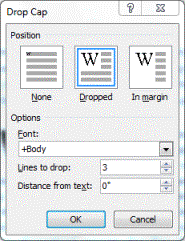
You can have the letter drop as many lines as you’d like, and even choose how much space to put between it and the text that follows.

Watermarks

You’re probably familiar with watermarks. They can sometimes be seen stamped into expensive bond paper, and they are visible when you hold twenty-dollar-bills up to the light. You’re probably thinking, though, “Cool, Word 2010 can do that?” The answer is, “Sort of.”

A real watermark is stamped into a page with expensive equipment. All Word 2010 does, really, is allows you to place a light, printable image behind all the text and objects in a document. You can use it to add an effect to the document, mark it as a sample or draft, or even authenticate it.

Unlike most objects that can be inserted into a document, the watermark button isn’t located on the Insert tab. Instead, to place one in your document, go to the Page Layout tab and look at the Page Background section of the ribbon. It is placed here because really, that’s what a watermark is-a background.

Several watermarks were included with your copy of Word 2010. They are things like “Confidential”, “Do Not Copy”, “Draft” and “Urgent.” If you are connected to the internet, you can easily browse watermarks that were created the Office 2010 community by clicking “More Watermarks from Office.com.”

You can also create custom watermarks using pictures on your computer or text of your own. Just click “Custom Watermark.” You’ll see a screen that looks like this:
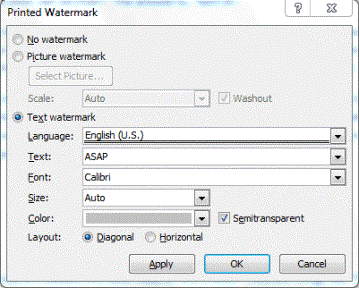
Choose your own language, font size and type, it’s orientation to the page (called “Layout”) and more. Type your text in the Text field (in the sample above the text chosen is “ASAP.”) Click okay to apply it.

You can remove a watermark at any time by returning to the Page Layout tab, selecting watermark, and clicking “Remove Watermark.”

Borders and Shading

Borders can be applied to an entire page, an entire document, or just certain sections of the document. They can also be applied to paragraphs.

To put a border around a page or a paragraph, go to the Page Layout tab and click the Page Borders button in the ribbon. It looks like this:

When you click the Page Borders button, a new dialogue box opens.
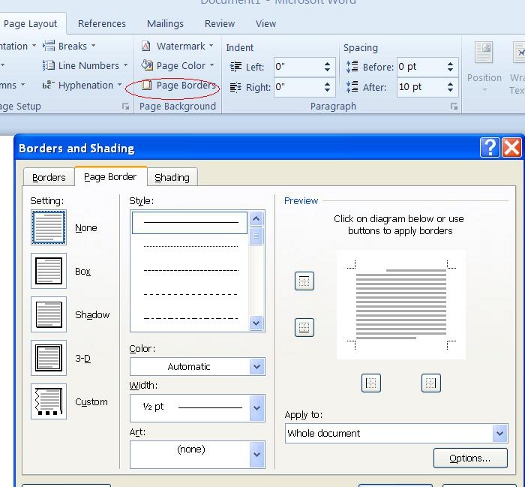
Use this window to define the attributes of your border. You can choose to remove a border by clicking the None box. Select a style, width, and color. You can even select some predefined artwork from the Art dropdown box.

Using the Apply to dropdown, you can choose whether to apply these settings to the entire document or just certain pages or sections.

Now take a look in the lower right hand corner of the window where it says “Options.” Click that for even more control over your border and shading options.
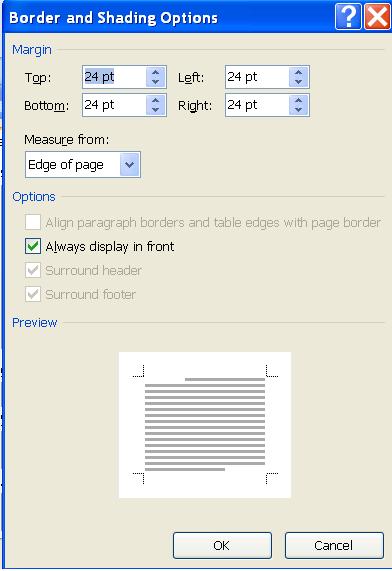
From here, you can choose the margins of your border, and whether or not to measure that from the edge of the page or the edge of the text. Click OK when you’re finished.

To create add shading to a page, click Page Borders and then Shading from the Borders and Shading dialogue window. A new window will open and look like this:
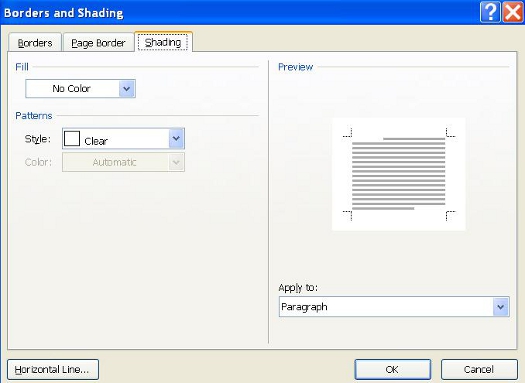
Select a color from the Fill dropdown menu, and a style. Click OK when finished.

Page Colors

Changing the page color is self-explanatory. To do so, click the Page Layout tab and then the Page Color button . Simply select a color from the menu. To create your own color, click “More Colors.” To add a gradient, texture, pattern, or picture, click “Fill Effects.”

Using and Formatting Multiple Columns and Text Boxes

There are several benefits to using multiple columns. They can:

oMake your documents easier to read

oMake them visually interesting

oMake them look professional

oAllow you to use space more efficiently

Below is an example of a document that was made more interesting simply by breaking the text up into columns.
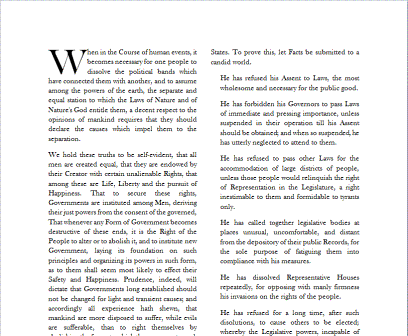
Adding columns to a document is incredibly easy. Go to the Page Layout tab and click the Columns Button.
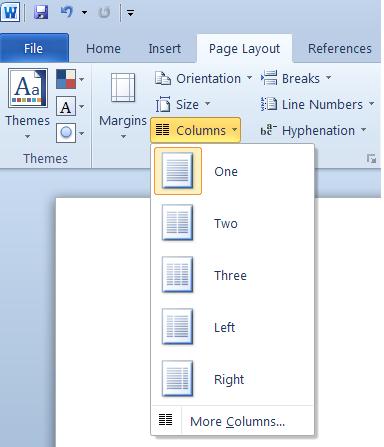
Now just select the number of columns or your preferred arrangement. For precise control over the column width and spacing, click “More Columns..”
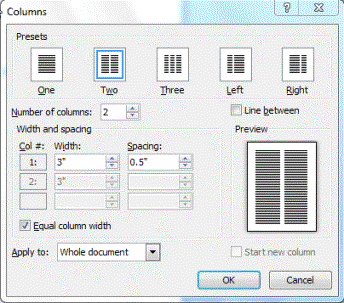
Click OK when finished.

Inserting and Resizing and Rotating Shapes

Word 2010, like past versions, provides you with a number of basic shapes you can use in your documents. They range from simple lines, to arrows, to banners, and just about every shape in between.

To see these shapes, go to the Insert tab and click the Shapes button.

Below is a chart of the different shapes available:
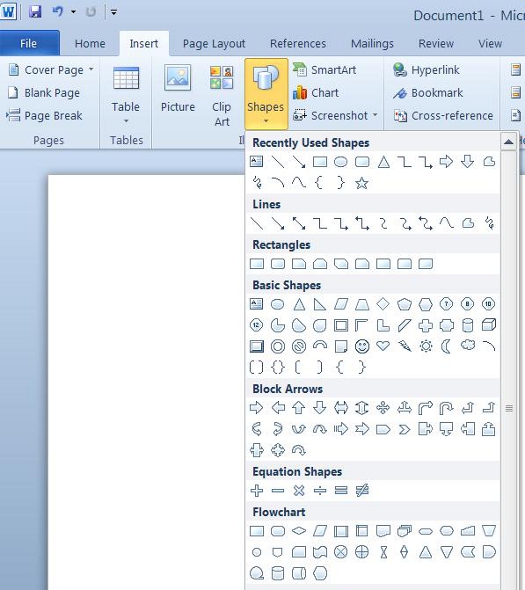
When you select a shape, your mouse pointer turns into a bold, black arrow. To insert the shape, click the place on the page you want it to appear, and while holding the left mouse button, drag it to the desired size.

Once a shape has been inserted into a document, you can resize it exactly the way you would any other object in Word: just select the object, position your mouse pointer over one of the corners, click and drag to the desired size.

Since you can interact with shapes the same way you interact with any other object you insert into Word, you can easily rotate it by clicking on it and dragging the round handle at the top of the object, or going to the Drawing Tools tab and clicking Rotate.

Stacking and Grouping Objects

In Word, you can stack objects or group them. Stacking an object means exactly what it implies: you’re putting one object on top of the other as in the example below. Every time you insert an object into Word, it automatically stacks on its own layer.

There are a couple of ways you can send an object forward to rearward. One such way is to select an object, then click the Drawing Tools tab. The Arrange section of the ribbon is on the right and looks like this:
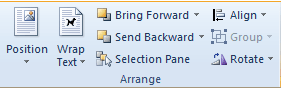
Click the Bring Forward button to move the object forward. Clicking the arrow next to the button gives you the option of adjusting the object forward one step, or all the way to the front.

The Send Backward button works in much the same way.

Grouping objects basically means combining them. Once you do this, you are able to move them or even rotate them as a single unit. The top picture shows the two objects as individuals. The picture on the bottom shows the objects after they’ve been grouped. Notice that Word acts as if the two objects are one.


To group one or more objects, select the objects, then navigate to the Drawing Tools/Format ribbon and select Group. You can also select the objects, right click on them, and select Group. You can also use the shift button to select more than one object.

To ungroup objects, navigate to the Drawing Tool/Format ribbon and select Ungroup.

Recruiting

Assignment 3: Recruiting

As an HR Manager, imagine you are presenting a new global recruiting strategy to the Chief Human Resource Officer of your company. Choose only one of the following countries: Germany

Greece,

Portugal

South Africa

Morocco

Ghana

Canada

Mexico

Jamaica

Japan

South Korea

Saudi Arabia

Brazil

Australia

Research business strategies for recruiting in your chosen region. Identify the top three to five (3-5) factors that would need to be considered when recruiting in the country you chose. Close with a persuasive summary on why you believe these factors are important. Close with a persuasive summary that explains why these factors are important. Demonstrate your findings to the Chief Human Resource Officer of your company in the form of a PowerPoint presentation.

Create a four to eight (4-8) slide PowerPoint in which you:

  1. Summarize your findings about recruiting in your selected countries listed above.You have the option to record a narration in the presentation for Assignment 3.
  2. Identify the top three to five (3-5) factors that would need to be considered when recruiting in your chosen region.
  3. Develop a persuasive closing summary that describes why the factors you identified are important.
  4. Include links or references to one to three (1-3) quality resources based on your research. Note: Wikipedia and similar websites do not qualify as quality resources.
  5. Format your assignment according to the following formatting requirements:
    1. Format the PowerPoint presentation with headings on each slide and one (1) relevant graphic (photograph, graph, clip art, etc.). Ensuring that the presentation is visually appealing and readable from up to 18 feet away. Check with your professor for any additional instructions.
    2. Include a title slide containing the title of the assignment, your name, your professor’s name, the course title, and the date.
    3. Use the APA format to reference your work, including in-text references when necessary. See the APA Guide located in the Student Center tab.

The specific course learning outcomes associated with this assignment are:

  • Analyze international business strategy to identify human resource requirements and formulate supporting HRM plans that can improve productivity and contribute to the firm’s competitiveness.
  • Propose staffing alternatives for foreign operations and address the considerations for the use of expatriates versus localization or third-country nationals.
  • Assess recruiting and selection strategies that can be used to effectively meet organizational requirements for operating in multiple countries.
  • Use technology and information resources to research issues in global HRM.
  • Write clearly and concisely about global HRM using proper writing mechanics.

Grading for this assignment will be based on answer quality, logic / organization of the paper, and language and writing skills, using the following rubric.

Points: 200

Assignment 3: Recruiting

Criteria

Unacceptable

Below 60% F

Meets Minimum Expectations

60-69% D

Fair

70-79% C

Proficient

80-89% B

Exemplary

90-100% A

1. Summarize your findings about recruiting in your chosen country.

Weight: 25%

Did not submit or incompletely summarized your findings about recruiting in your chosen country.

Insufficientlysummarized your findings about recruiting in your chosen country.

Partiallysummarized your findings about recruiting in your chosen country.

Satisfactorilysummarized your findings about recruiting in your chosen country.

Thoroughlysummarized your findings about recruiting in your chosen country.

2. Identify the top three to five (3-5) factors that would need to be considered when recruiting in your chosen region.
Weight: 30%

Did not submit or incompletelyidentified the top three to five (3-5) factors that would need to be considered when recruiting in your chosen region.

Insufficientlyidentified the top three to five (3-5) factors that would need to be considered when recruiting in your chosen region.

Partiallyidentified the top three to five (3-5) factors that would need to be considered when recruiting in your chosen region.

Satisfactorilyidentified the top three to five (3-5) factors that would need to be considered when recruiting in your chosen region.

Thoroughlyidentified the top three to five (3-5) factors that would need to be considered when recruiting in your chosen region.

3. Develop a persuasive closing summary that describes why the factors you identified are important.

Weight: 30%

Did not submit or incompletelydeveloped a persuasive closing summary that describes why the factors you identified are important.

Insufficientlydeveloped a persuasive closing summary that describes why the factors you identified are important.

Partiallydeveloped a persuasive closing summary that describes why the factors you identified are important.

Satisfactorilydeveloped a persuasive closing summary that describes why the factors you identified are important.

Thoroughlydeveloped a persuasive closing summary that describes why the factors you identified are important.

4. 1-3 References

Weight: 5%

No references provided

Does not meet the required number of references; all references poor quality choices.

Does not meet the required number of references; some references poor quality choices.

Meets number of required references; some references high quality choices.

Meets number of required references; all references high quality choices.

5. Clarity, writing mechanics, and formatting requirements.

Weight: 10%

More than 8 errors present

7-8 errors present

5-6 errors present

3-4 errors present

0-2 errors present

Complete assignment for Integrated Business Operations Course

Data Analysis Exercise

1.In Week 1 you identified a process collected 10 to 30 consecutive data points. All of the data should have been collected under essentially the same conditions. The differences between the values should be expected to represent nothing more than random variation. (If during the data collection, you observed a significant change in values due to a possible change in conditions, don’t reject the data points; simply make a note of it and include this information in your commentary.) You collected and recorded the consecutive data points into a single column in a Minitab Worksheet. You saved the file as a Minitab project using the menu bar at the top: File>Save Project As>file name. The file name will automatically be given the .mpj suffix.

2.Now is the Week 2 assignment. Create a graphical summary of the data as follows: Stat>Basic Statistics>Graphical Summary. This will open the Graphical Summary window. Double click on your data column in the left pane and this will select your data and place it into the Variables pane. (Click on Help to learn much more about this function.) Click on OK. The results should look as follows:

3.Write a short commentary on Graphical Summary results. Pay particular attention to the histogram, mean, standard deviation and outliers. Describe how the histogram and statistics relate to the process from which the data were collected.

Please submit your assignment in report form as a Word document, as if submitting to management or a client. Cut and paste pertinent Minitab graphs and analysis. Attach the Minitab file as a supporting document.

If you have any problems concerning Minitab, please post the question in the Study Hall Forum. The instructor will monitor this forum but a fellow student may respond even more quickly. Feel free to work together to figure out Minitab, but I think that you will find it to be very user friendly.

Food and Beverage

Overview: The purpose of this activity is to reflect on the role of the reading activity in the context of your professional development and the field of food service management & operations.

Objectives: After completing this exercise, you should be able to:

  • Identify the major themes/concepts presented in the reading.
  • Apply knowledge gained from the article to project on your development as a food service professional.

Instructions:

  1. You should have completed reading before participating in the discussion (Please click and read the PDF file enclosed here in Discussion Board: Try a Little Trendiness 9 Hottest Beverage and Food Trends of 2019.pdf ” attachment “
  2. In this activity, you are expected to draft a thoughtful, concise response of approximately 200-250 words incorporating the following two questions:
    1. In what ways is the material covered in this article relevant to food service management?
    2. In what ways can you utilize the ideas and tools covered in this reading in your food service management?
  3. Your blog should rely on specific citations from:
    1. the reading
    2. meaningful trends you have personally observed
    3. your own reflection.
  4. Tips for Success:
    1. Suggest some innovative/creative tactics that can be applied in food service management & operations
    2. Ask yourself whether you have supported your contentions.

    please after your work can you give me the main idea or the summary that can I talk about the homework front of my classmate.

COM223 Persuasion in Communication

Week 2 – Assignment

Ethics and Persuasion

Prepare a 1000-1500 word paper (do not include title and reference pages in your word count), formatted according to APA style as outlined in the Ashford Writing Center, that details the importance of ethical behavior and its significance in persuasion. Define at least two ethical theories in your paper, and identify and describe the impact that ethical practices have on persuasion. Your paper must include at least three outside scholarly sources to support your opinions. You should choose an effective example to clearly illustrate your viewpoints such as a current event issue or personal experience.

The Ethics and Persuasion paper

Carefully review the Grading Rubric (Links to an external site.) for the criteria that will be used to evaluate your assignment.

MT499 Unit 4: Analyze organizational processes and procedures, management homework help

Please use the attached documents from previous assignments to do this assignment. As I’m supposed to build from those.

In a 3 to 4 page paper, address the following areas pertaining to operations in your organization:

  • If you are in a production environment, please provide detailed instructions on how you plan to manufacture your product.
  • If you are a service-based business, please explain the business flow of how you plan to service your client base.
  • Analyze organizational processes and procedures in a variety of business settings.

Assignment checklist

  1. Describe the general business operations for manufacturing and service companies.
  2. Provide an explanation of the manufacturing or service business flow used in your selected company.

When you are ready, you may submit your paper to the Assignment Dropbox. *Note, include your name in the file name of the Assignment.

Aspect Percentage of assignment Score MT499 Assignment Criteria
Content, Focus, use of Research 50% (30pts) Addresses all assignment requirements, indicates depth of knowledge about the topics and key areas, contains a clear and concise introduction with a thesis statement, comprehension body of paper, closing summary, and includes a minimum of three cited and referenced resources (APA 6th edition).

Analysis

and

Critical

Thinking

30% (18pts) Analysis and critical thinking indicates optimal reasoning with a defined purpose, based on assumptions, writer’s point of view, discusses the advantages and disadvantages, and uses data, information, and concepts/ideas to address the assignment topics or key areas in the paper.

Writing

Style,

Grammar,

APA

Format

20% (12pts) The capstone uses the APA (6th edition) writing style using active voice, which is in third person and concisely written. The paper is free from incorrect punctuation, use of jargon/clichés, incorrect grammar and mechanics, and is correctly formatted based on APA 6th edition guidelines.
Total Points 100% (60pts)

Wordlwide Accoutning Diversity and International Standrds

Accounting:Worldwide Accounting Diversity and International Standard

Reconciliation of IFRS to U.S. GAAP

Unless they use IFRS, foreign companies with securities
listed in the United Sates (in the form of ADRs) are required to reconcile
their net income and stockholders’equity to U.S. GAAP in the annual report
(Form 20-F) they file with the Securities and Exchange Commission (SEC). List
of foreign SEC registrants are available on the internet at www.adrbnymellon.com; click on DR
Directory & Profiles. Annual reports of foreign SEC registrants may be
accessed through the SEC’s EDGAR system at www.sec.gov
(under Filing Type, search for 20-F). However, not all foreign registrants file
their reports with the SEC electronically. Many non U.S. companies make annual
reports available on their corporate Internet home page. Access a recent annual
report (Form 20-F) for a foreign company listed on the New York Stock Exchange
that does not use IFRS to complete the following requirements.

Required:

a. 
Determine the nationality of the company
selected and the accounting rules and regulations it used (company GAAP) to prepare
its financial statements.

b. 
Summarize the major differences in measuring net
income between company GAAP and U.S. GAAP.

c. 
Compare the company’s profitability using
company GAAP and U.S. GAAP

SPN1121 Discussion 2 – Penpal

1. Refer back to what you’ve learned in your VHL Central Portales lessons.

2. Go to the Pen-Pal 2 Discussion Topic, and post a new thread:

Your Pen-Pal is coming to visit you and is interested in finding out about your daily diet and the diet of your family. Write an e-mail to your Pen-Pal describing your daily menu. You should give your Pen-Pal an example by describing what you ate the day before for breakfast lunch, and dinner (using past tense).

Your initial post should be at least 6 sentences in length.

3. Return to the Pen-Pal 2 Discussion Topic after your initial post, and reply to a classmate’s initial post by comparing your daily menu with your classmate’s in Spanish. You should also include what you ate the day before.

You must select a classmate’s post that does not already have a reply.

Attention! The initial posting and question should be done by the Thursday of the second week of lesson 8 at 11:59 pm. If a question is not posted below your initial posting by Thursday at 11:59 pm, your instructor will post a question. You will not be able to get credit for the question if it is not posted on time.

4. Return to the Pen-Pal 2 Discussion Topic after a classmate has replied to your original post. Post a reply to the post.

Hey, please assist and also include 2 general replies that I do not have to change much. I like to eat bacon, bread and plantain for breakfast and since I work multiple jobs, I eat multiple lunch etc. Just build from the previous discussion and let me know if you need anything from.

Leadership Blog

Resources: Videos listed in the Week 5 Electronic Reserve Readings and Leadership Blog Template

Scenario: You are the CEO of MegaGlobe Business Solutions, a financial consulting corporation based in Chicago that has just recently opened new offices in São Paulo, Brazil and Shenzhen, Guangdong, China. As part of this transition, your employees will now be working collaboratively with employees at these locations to provide financial consulting services in these new markets. To assist with the transition, you will develop an internal leadership blog for your employees that addresses the implications of leading within a culturally-diverse and changing global business environment. This blog should focus on the need to positively adapt to a variety of leadership styles and individual differences within these cultures.

View the videos listed in this week’s classroom materials for ideas about how to effectively lead, motivate, and communicate with your employees about the need to adapt within this changing business environment. Which the videos are listed below

Write a 700- to 1,050-word internal leadership blog using the Leadership Blog template, and include the following:

Explain the implications of leading within a changing global business environment.

Describe the Team Leadership Model and how this relates to your current business practices.

Outline positive aspects of gender, diversity, culture, and teamwork that can improve overall business performance.

Apply principles of motivational leadership within a variety of diverse cultures.

Use at least one image, photo, chart, or graph to deliver a key concept within your blog.

Format your assignment consistent with APA guidelines

A short business law paper

A major goal of the course is to help you develop the ability to identify situations where legal issues could arise so that you can make informed decisions and effectively manage risk in the business world. To develop this “issue spotting” skill, you must maintain a mindset of legal awareness. This requires you to think about concepts studied in the course outside of the classroom.

For this assignment, find one article online that relates to a topic we have studied in this course. The article should expand on a topic discussed in class and provide a useful example of how the law impacts business activities and individuals. You can use any reliable online source for your article. You can use news websites such as cnn.com or wsj.com, websites like insidecounsel.com, or even blogs.

Your response should include the following elements:

  1. A link to the article you found;
  2. A brief overview of what your article is about (summarize in your own words; do not copy and paste from the article);
  3. A discussion of how the article relates to class; and
  4. Why you think the article is important or helpful to future managers, entrepreneurs, or others in the business world.